n8n
This page builds one working automation end to end: an inbound WhatsApp
message creates a task named Write back to <contact>, linked to that
contact.
It uses n8n-nodes-alphone,
the community node for AlphOne. For the engine neutral view, and for
driving AlphOne from any other engine with plain HTTP, see the
automation guide.
What you need
Section titled “What you need”- An n8n instance you administer, self hosted or cloud
- AlphOne 0.7.0 or newer, reachable from n8n over HTTP
- An AlphOne admin account, to mint the token the trigger uses
1. Install the node
Section titled “1. Install the node”In n8n, open Settings then Community nodes then Install, and
enter n8n-nodes-alphone. Only Owner and Admin accounts may install
community nodes.
Two nodes appear afterwards. AlphOne performs actions, and AlphOne Trigger starts a workflow when something happens.
Self hosted instances need community packages enabled, which is the
default. If installation is refused, set
N8N_COMMUNITY_PACKAGES_ENABLED=true and, until the node passes n8n
verification, N8N_UNVERIFIED_PACKAGES_ENABLED=true.
2. Mint an API token
Section titled “2. Mint an API token”An engine cannot hold a browser session, so it authenticates with a token. On the AlphOne host:
alphone token:create -email you@example.com -name "n8n" \ -scope meta:read -scope webhooks:write -scope tasks:write -scope contacts:readThose four cover this guide: meta:read for the credential test, webhooks:write
for the trigger to register and remove its subscription, tasks:write to create
tasks, and contacts:read to look contacts up. Drop any your workflow does not
need.
The AlphOne Trigger node creates, lists and deletes its subscription with
this token, and webhooks:write alone is not enough for that. The token’s
account must also hold the manage_webhooks capability, which in a stock
install means an admin, so mint the token for an admin’s account. A member’s
token still works for the AlphOne action nodes, such as tasks and
contacts. To keep those on a member’s token, create a second credential with
an admin’s token and pick it on the AlphOne Trigger node only.
The secret prints once and is stored only as a hash. Copy it now, because it cannot be recovered, only replaced.
A token acts as the user who created it, so create it against the account whose work the automation should own. Disabling that user stops their tokens the way it already stops their sessions.
Two limits narrow it further. Each -scope names an area and whether
the token may write there, and a token holds nothing it was not
granted. Leave -scope out and the token gets every area, which is
rarely what an automation needs. Area names are exact, so a typo like
contact:read is refused when you mint it rather than failing later.
A token also never reaches further than the person who created it. Mint it against an account that already does the work you are automating.
A token also expires. Without -ttl it lasts ninety days by default,
set with ALPHONE_TOKEN_TTL_DAYS, and after that every request answers
invalid token. Pass -ttl 30 for a shorter life, or -ttl never for
one that does not expire. Run
alphone token:list -email you@example.com to see the scopes and the
expiry date of every token you hold.
3. Create the credential
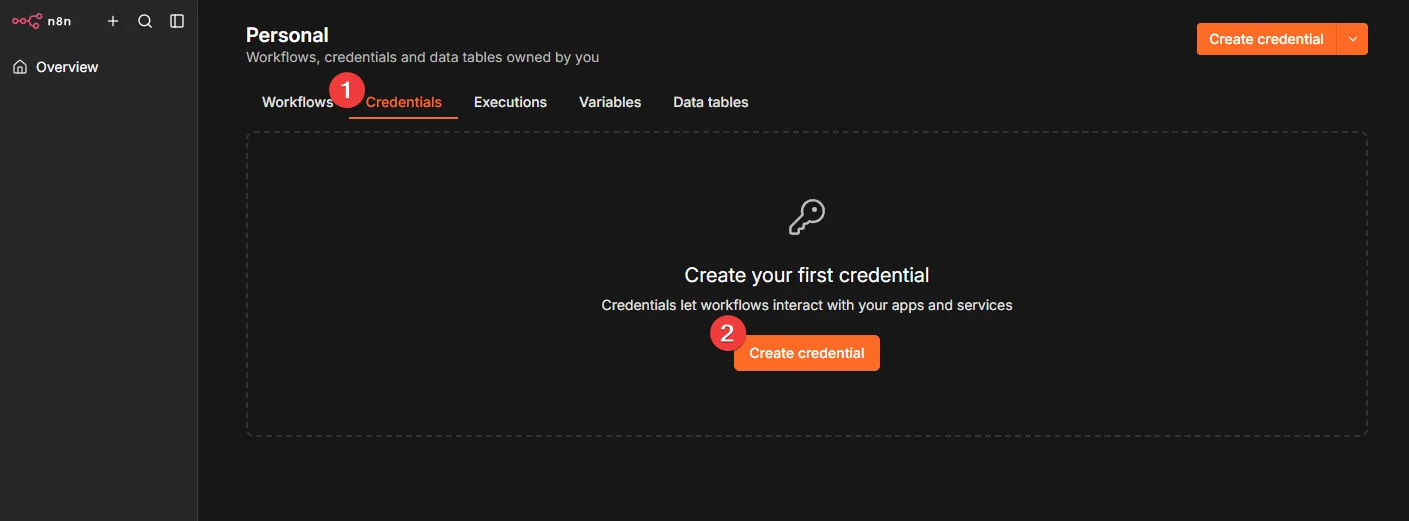
Section titled “3. Create the credential”Open the Credentials tab and press Create credential.
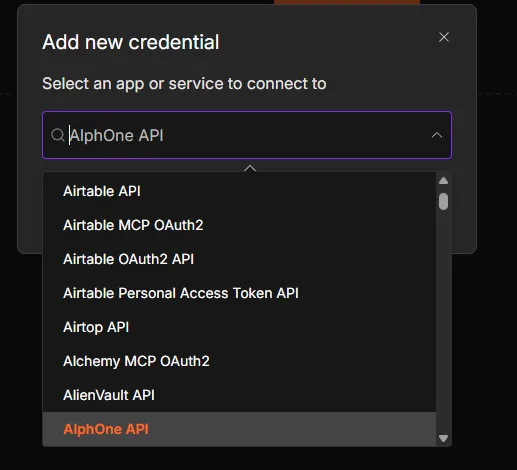
Search for AlphOne API and select it.
Fill in two fields and save.
| Field | Value |
|---|---|
| Base URL | where n8n reaches AlphOne, with no trailing slash |
| API Token | the secret from step 2 |
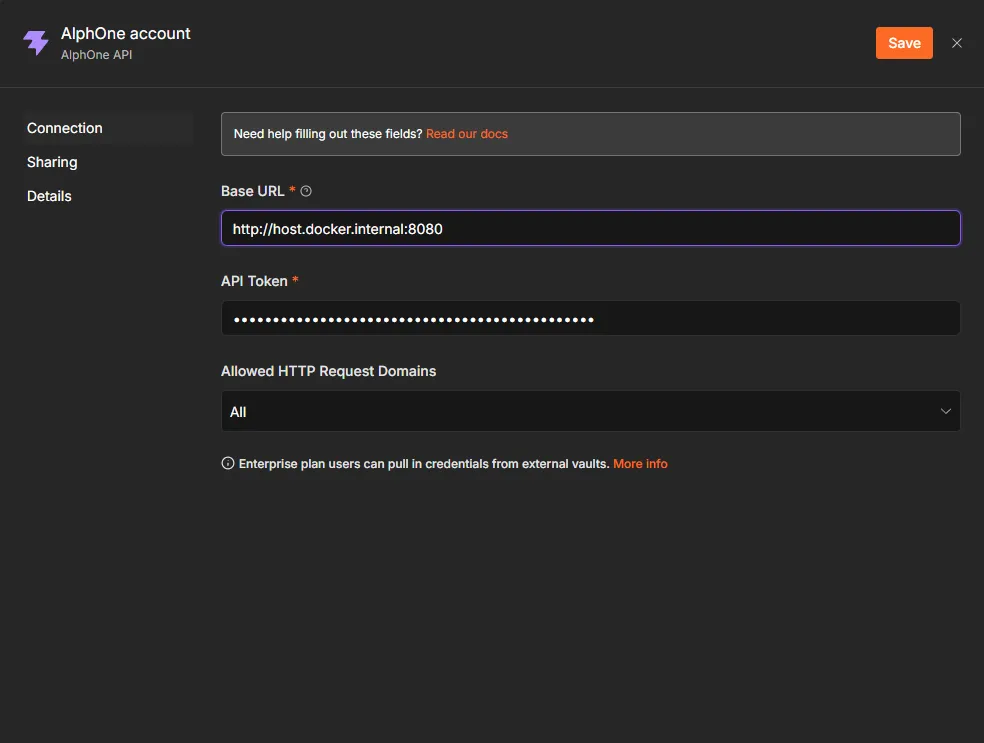
The base URL depends on where each side runs:
| AlphOne runs | Base URL from inside n8n |
|---|---|
| On your machine, n8n in Docker | http://host.docker.internal:8080 |
| Both in the same compose project | http://alphone:8080 |
| A deployed instance | its public URL |
localhost inside a container means the container itself, never your
machine, so it will not reach AlphOne.
Press the test button. It asks AlphOne for its version, which needs a valid credential, so a success there proves the whole connection.
4. Start a workflow
Section titled “4. Start a workflow”Open the Workflows tab and press Create workflow.
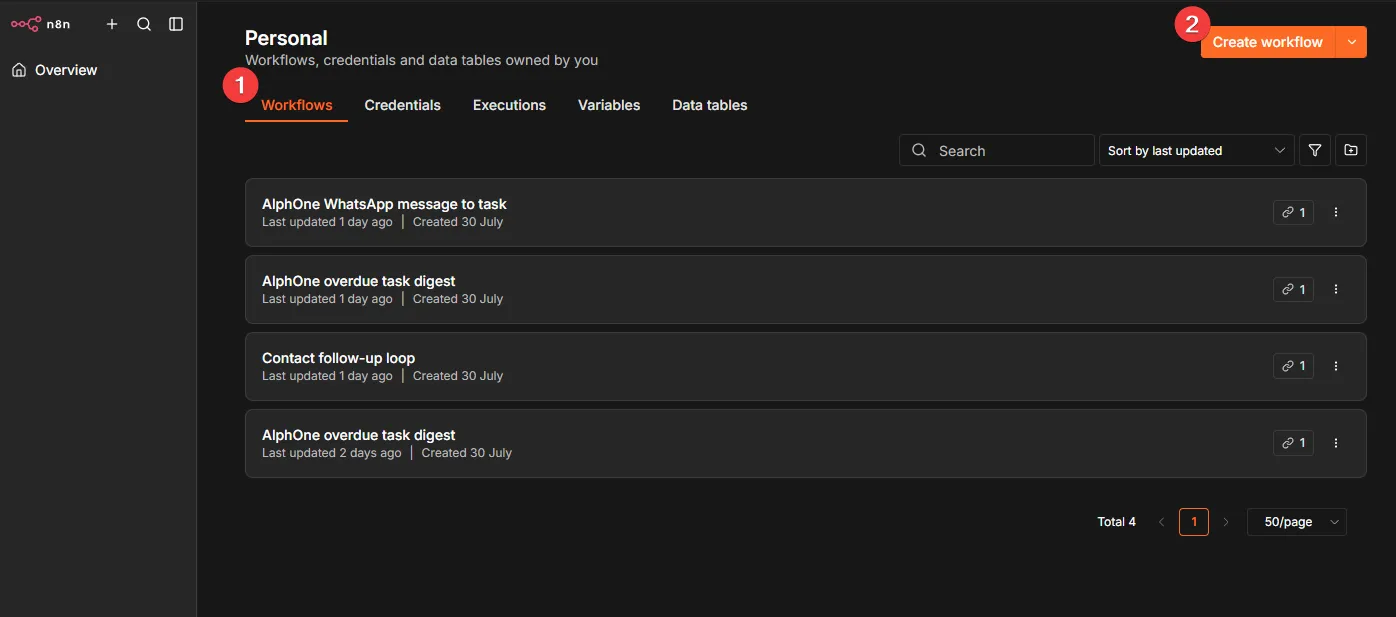
Press Add first step and search for alphone.
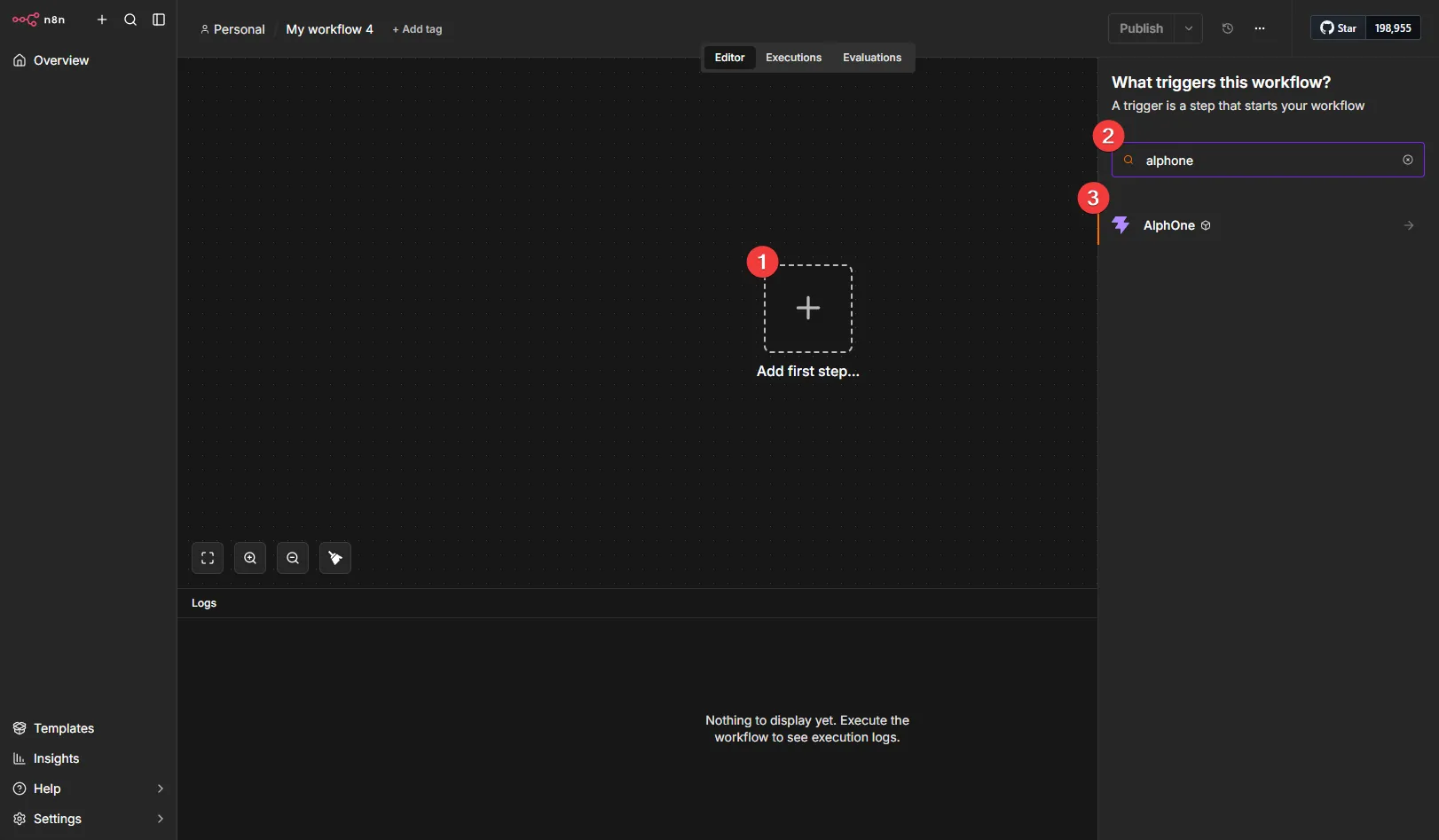
The node offers a trigger for each event it supports.
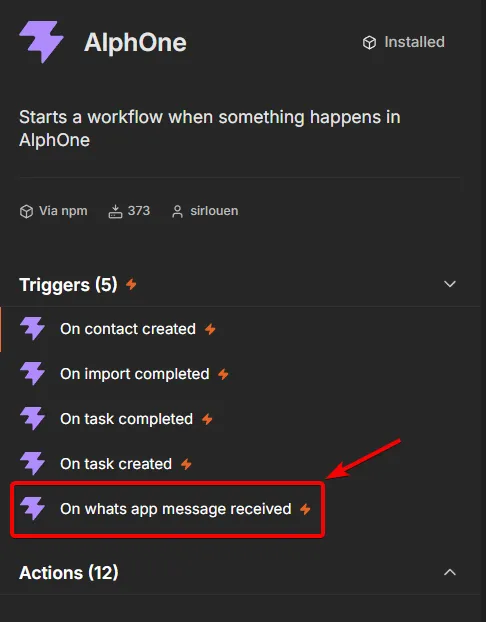
Choose On whats app message received.
5. Configure and test the trigger
Section titled “5. Configure and test the trigger”Pick the credential from step 3, and confirm the event reads WhatsApp Message Received.
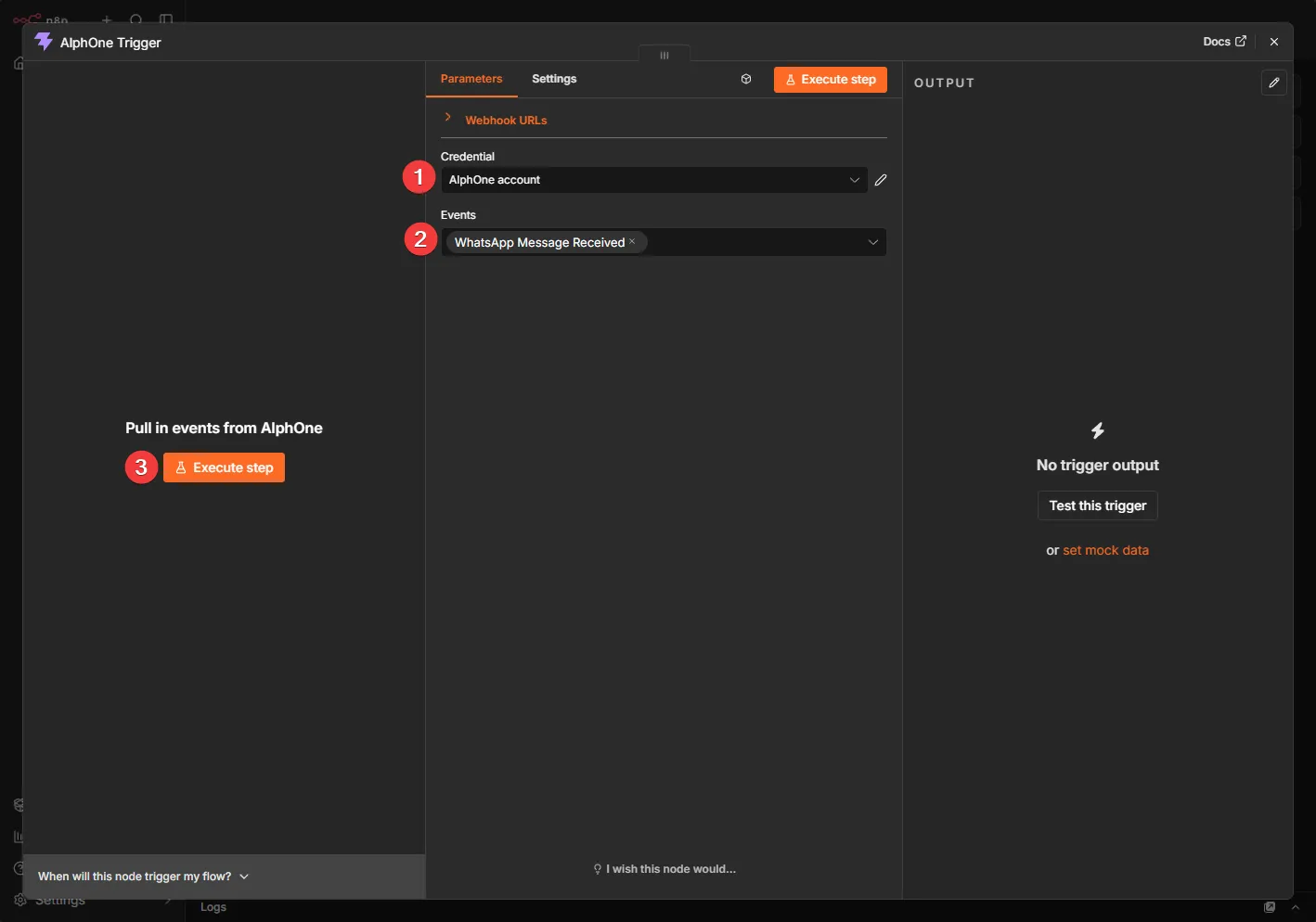
Press Execute step. n8n waits for a real event.
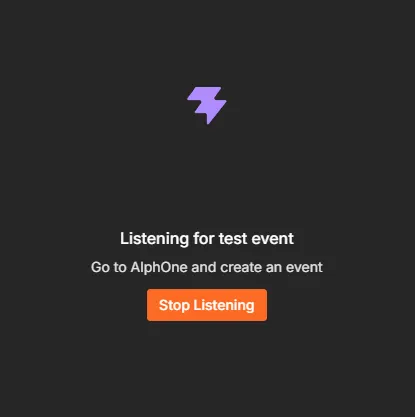
While it listens, send a WhatsApp message to your connected number. The envelope arrives:
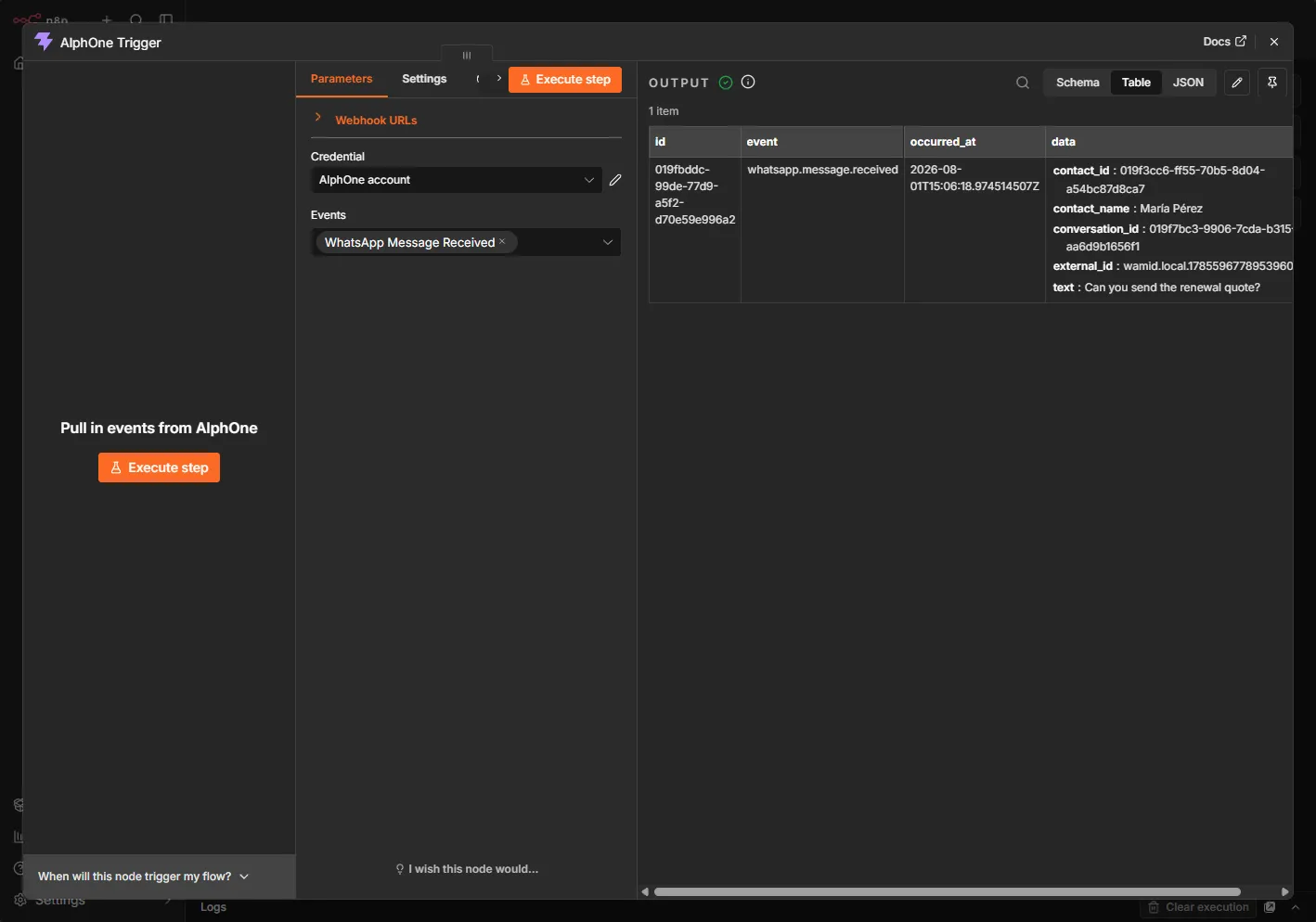
Every delivery carries the same four fields. id names the event and
stays the same across retries, so store it if you need to drop
duplicates. data carries the subject, and for whatsapp.message.received
that means conversation_id, contact_id, contact_name,
external_id, and text. The webhooks
reference documents the envelope in full.
Testing this way needs no published workflow, which makes it the fastest way to see real data before building the rest.
6. Create the task
Section titled “6. Create the task”Press the + after the trigger. The node groups its actions by resource, one group per kind of record it reads and writes.
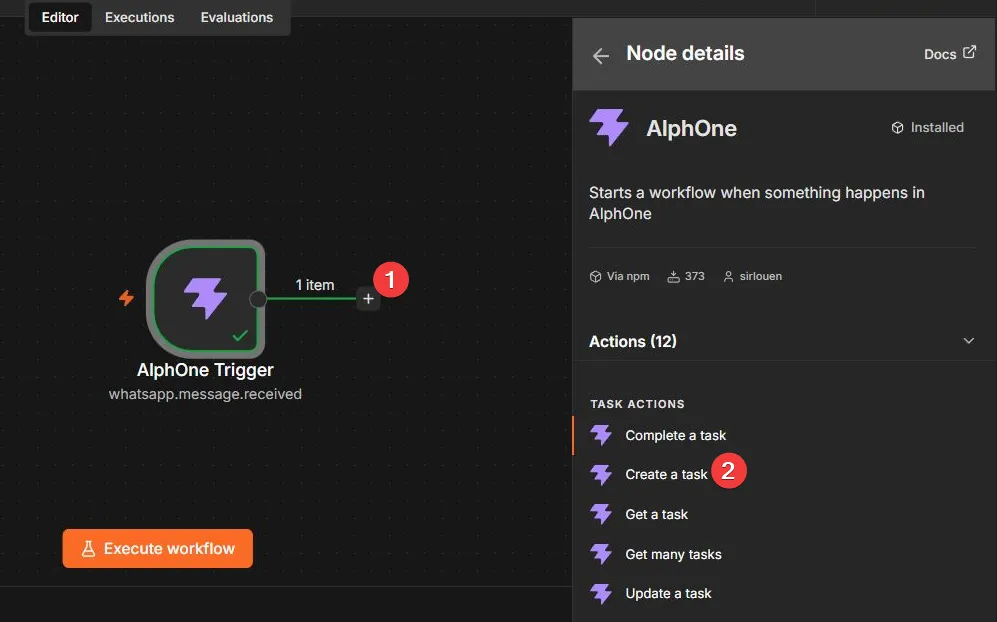
Choose Create a task and set:
| Field | Value |
|---|---|
| Resource | Task |
| Operation | Create |
| Title | Write back to {{ $json.data.contact_name }} |
| Due On | leave the default |
Then Add Field under Additional Fields:
| Field | Value |
|---|---|
| Contact ID | {{ $json.data.contact_id }} |
Switch each of those to expression mode with its fx toggle, then type
the value without a leading =. n8n adds that prefix itself when it
stores the parameter, so typing one leaves a stray = in the value. A
stray = in Title is stored as part of the task title, and a stray =
in Contact ID is refused with a VALIDATION error naming the bad uuid,
which the node reports as a failed step. The small preview under each
field shows the resolved value, so check it reads
Write back to Maria Perez and a bare uuid before running.
Press Execute step.
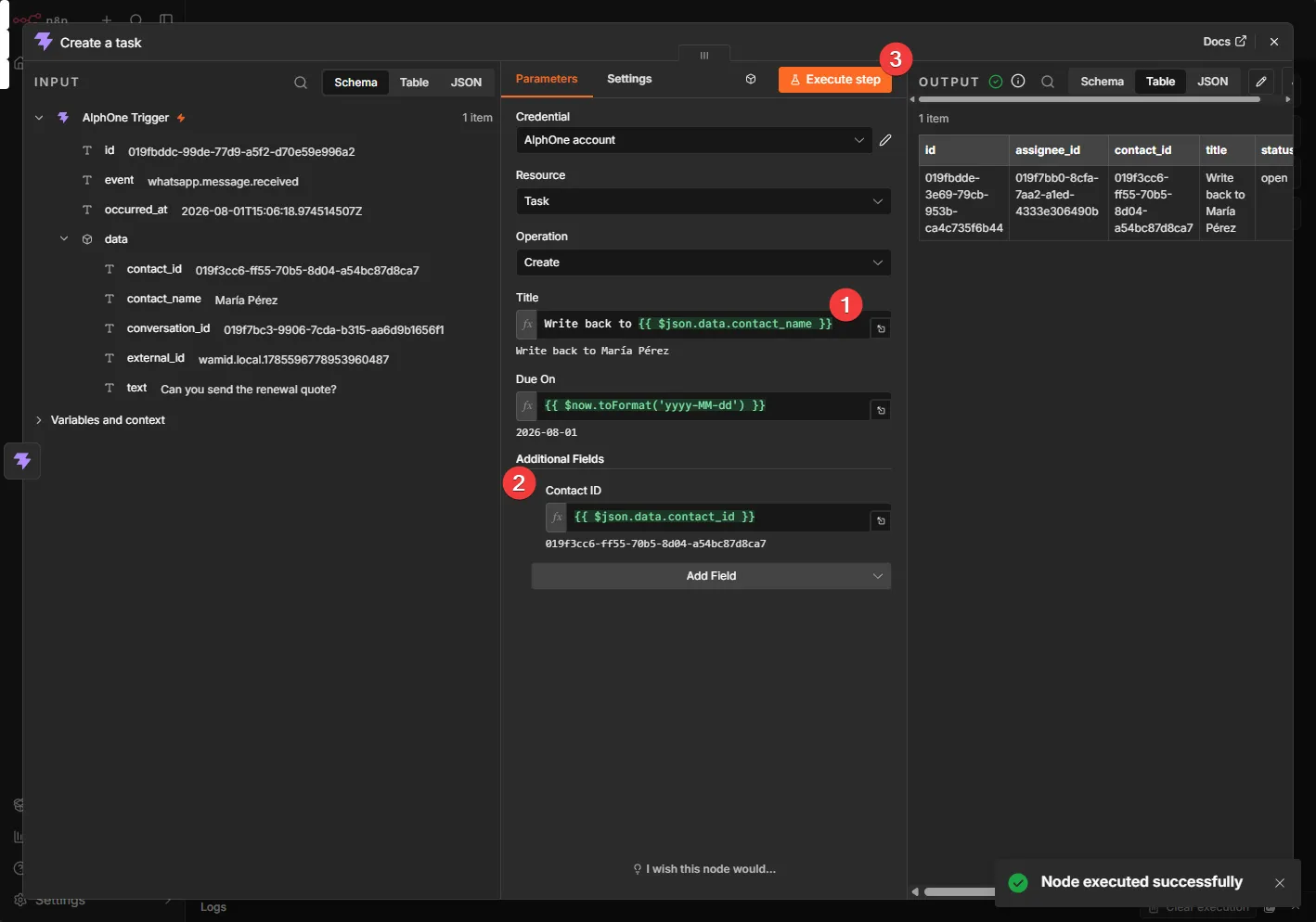
The task exists in AlphOne now, linked to the contact who wrote in.
7. Publish
Section titled “7. Publish”Name the workflow and press Publish.
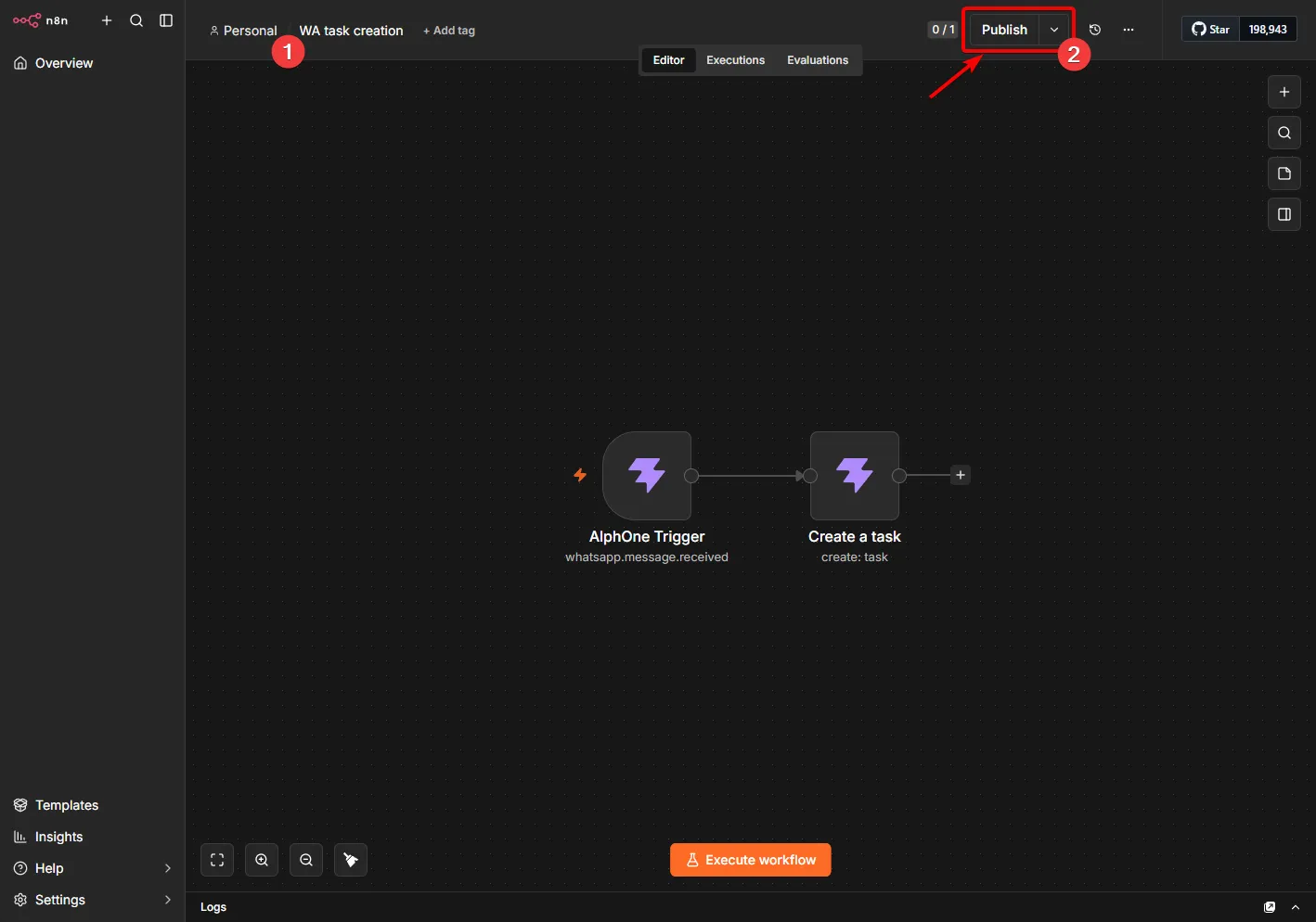
Publishing is what registers the webhook. The trigger asks AlphOne to create a subscription and stores its id and its signing secret in workflow static data. An unpublished trigger has no subscription, so nothing is delivered to it.
Confirm AlphOne agrees, using the token from step 2:
curl -s https://your-domain/api/graphql \ -H "Authorization: Bearer $TOKEN" -H 'Content-Type: application/json' \ -d '{"query":"{ webhooks { id url events } }"}'A subscription pointing at your n8n webhook url means the loop is live. From now on, every inbound WhatsApp message creates its task on its own.
When n8n runs next to AlphOne
Section titled “When n8n runs next to AlphOne”n8n builds its webhook urls from its WEBHOOK_URL setting, and AlphOne
refuses to deliver to internal addresses unless the operator allows them.
Which one you have decides whether AlphOne needs an entry:
| n8n’s webhook urls start with | Add to AlphOne’s environment |
|---|---|
a public https address | nothing |
http://n8n:5678, both in the same compose project | ALPHONE_WEBHOOK_ALLOWED_HOSTS=n8n:5678 |
http://localhost:5678, both on your machine | ALPHONE_WEBHOOK_ALLOWED_HOSTS=localhost:5678 |
Restart AlphOne after adding it. The entry opens that one host and port and nothing else on the network. Without it the workflow publishes and the subscription exists, but every delivery is refused. Configuration explains the format.
How AlphOne marks automated work
Section titled “How AlphOne marks automated work”A task created with an API token records token:<name> in its
origin_source, so work an automation created stays distinguishable
from work a person typed. Attribution comes from the credential rather
than the request, so a workflow cannot claim to be someone else, and it
needs nothing from you.
Deliveries and retries
Section titled “Deliveries and retries”AlphOne signs every delivery with HMAC-SHA256 over the exact bytes sent, and the node verifies that signature before running the workflow, so a forged request is rejected. Delivery is at least once, retried with a widening wait for 24 hours, so a workflow that survives a restart catches up on its own. Answer quickly, because AlphOne waits 10 seconds.
To see what happened from the AlphOne side, read the delivery queue:
docker compose exec postgres psql -U postgres -d alphone -c \ "SELECT event_name, status, attempts, last_error FROM core.webhook_deliveries ORDER BY created_at DESC LIMIT 5"delivered with attempts = 1 means the chain worked first time. A
last_error naming webhook: address refused means AlphOne refused n8n’s
address, see When n8n runs next to AlphOne.
When it does not work
Section titled “When it does not work”| Symptom | Cause |
|---|---|
| The credential test fails | The base URL has a trailing slash, or says localhost where the container cannot reach AlphOne, or the token expired |
invalid token | The token expired, was revoked, or the token id was pasted instead of the secret. Run alphone token:list -email you@example.com to see its expiry. Only the value starting a1_ authenticates |
scope required: contacts:write | The token was not granted that area. Mint a replacement with the -scope it needs, tokens cannot be widened in place |
| Nothing arrives after publishing | No subscription exists. Ask for webhooks and republish |
Publishing a workflow with an AlphOne Trigger fails with admin required | The credential’s token belongs to an account without manage_webhooks, which in a stock install means it is not an admin. Mint a token for an admin’s account and use it in the trigger’s credential |
A subscription exists but nothing arrives, AlphOne logs refusing a webhook delivery to an internal address | n8n’s webhook url is on your own network. Add its host and port to ALPHONE_WEBHOOK_ALLOWED_HOSTS, see above |
Publishing fails with url names an internal address | n8n’s webhook url is an internal IP address. Add that address and its port, such as 10.0.0.5:5678, to ALPHONE_WEBHOOK_ALLOWED_HOSTS, or set WEBHOOK_URL to a public https address. A host name in its place passes this check, but every delivery is then refused until its entry is listed |
Deliveries stuck pending with subscriber answered 301 or another 3xx | n8n’s webhook url forwards somewhere else and AlphOne never follows. Set WEBHOOK_URL to the final address |
A task titled with literal {{ }} | The field is not in expression mode. Use its fx toggle |
The task node fails with a validation error naming the id, previews show a leading = | An = was typed into the expression editor. n8n adds it, so delete yours |
Deliveries stuck pending with subscriber answered 404 | A subscription outlived its workflow. Delete it with the deleteWebhook mutation |
Beyond this workflow
Section titled “Beyond this workflow”The same two nodes cover every event AlphOne publishes, listed in the
webhooks reference, and every action the node
offers. A schedule trigger with Get many tasks filtered by
due_before makes a morning digest of overdue work, with no trigger
registration involved.
Ready made workflows
Section titled “Ready made workflows”The package ships example workflows in its examples folder. Import one
from the n8n canvas menu, then open each AlphOne node and pick your
credential, which the files leave as a placeholder.
overdue-task-digest.jsoncollects the tasks you have not finished and builds a message from them, every morning at eight.whatsapp-message-to-task.jsoncreates a task the moment a WhatsApp message arrives, linked to the contact AlphOne resolved it to.import-to-daily-tasks.jsonturns a finished contact import into a call list spread over days, twenty a day, with each task carrying its import row so a re-run creates nothing twice. The automation guide explains the recipe behind it.